
How to Keep your Voice While Editing in 2026: A Step-by-Step Guide That Actually Works
On this page
- What It Actually Means to Keep Your Voice While Editing
- Why Voice Gets Lost During Editing (and How to Stop It Before It Starts)
- Step-by-Step: How to Keep Your Voice While Editing Written Work
- How to Make Your Voice Sound Better in Editing Without Losing What Makes It Yours
- How to Make Your Voice Sound Good While Recording (So Editing Is Easier)
- How Do You Actually Hear Your Real Voice? Understanding the Playback Gap
- Using AI Editing Tools Without Letting Them Flatten Your Voice
- Voice Preservation in the College Admissions Essay: Why the Stakes Are Higher Here
- FAQ
- How do I edit a video that uses my own voice without losing the natural feel?
- Why does my voice sound so different when I record it?
- Which app is good for voice editing on a phone?
- How do I stop hating my voice when I edit and record?
- How do I add a voiceover to a video online?
- Is an essay editing service worth it for college applications?
To keep your voice while editing, do three things before you change a single word: read the draft aloud and mark every phrase that sounds unmistakably like you, label those phrases as protected, and separate structural edits from line edits so big-picture changes come first. In audio editing, use a light hand on EQ and compression, apply a high-pass filter around 80-100 Hz to remove low-end rumble, and stop before over-processing strips warmth from your natural tone. Editing removes what distracts. It does not replace your voice with a polished stand-in.
Prompt text and word counts should be verified against commonapp.org each cycle, since the Common App refreshes prompts and school-specific requirements annually. The rest of this guide walks through the ordered process, the audio parameters, and the essay-specific stakes.
What It Actually Means to Keep Your Voice While Editing
Voice is the fingerprint of your writing or your recording. In prose, it lives in sentence rhythm, word choice register, tonal consistency, and the distinctive phrasing patterns you return to without thinking. In audio, it lives in your natural vocal tone, your pacing, and the small imperfections that mark the recording as human. Editing should sharpen those signals, not sand them off.
Three types of edits exist, and they operate at different depths. A structural edit rearranges paragraphs, cuts entire sections, or changes the argument. A line edit rewrites individual sentences for clarity and flow. A copy edit fixes grammar, spelling, and punctuation. Voice erosion usually happens at the line-edit stage, when a well-meaning reader (or an AI tool) swaps a sentence you'd actually say for a sentence that reads more formally.
Here's a quick before-and-after. Original: "I figured out the code was wrong when nothing on the screen moved." Line-edited: "I determined the code contained an error when the display remained static." Both sentences are grammatical. Only the first sounds like a 17-year-old talking. In the Common App personal statement, which caps the personal statement at 650 words, the first sentence is the one that earns the read.
Admissions readers at selective colleges move through hundreds of essays each cycle. In our essay coaching work, over-edited prose is identifiable within the first paragraph, and the pattern is consistent: elevated vocabulary the applicant would not use in conversation, sentence structures that feel imported, and a tonal flatness that reads as committee-written. For a deeper walkthrough on revision order, see how to edit and revise your college essay.
Why Voice Gets Lost During Editing (and How to Stop It Before It Starts)
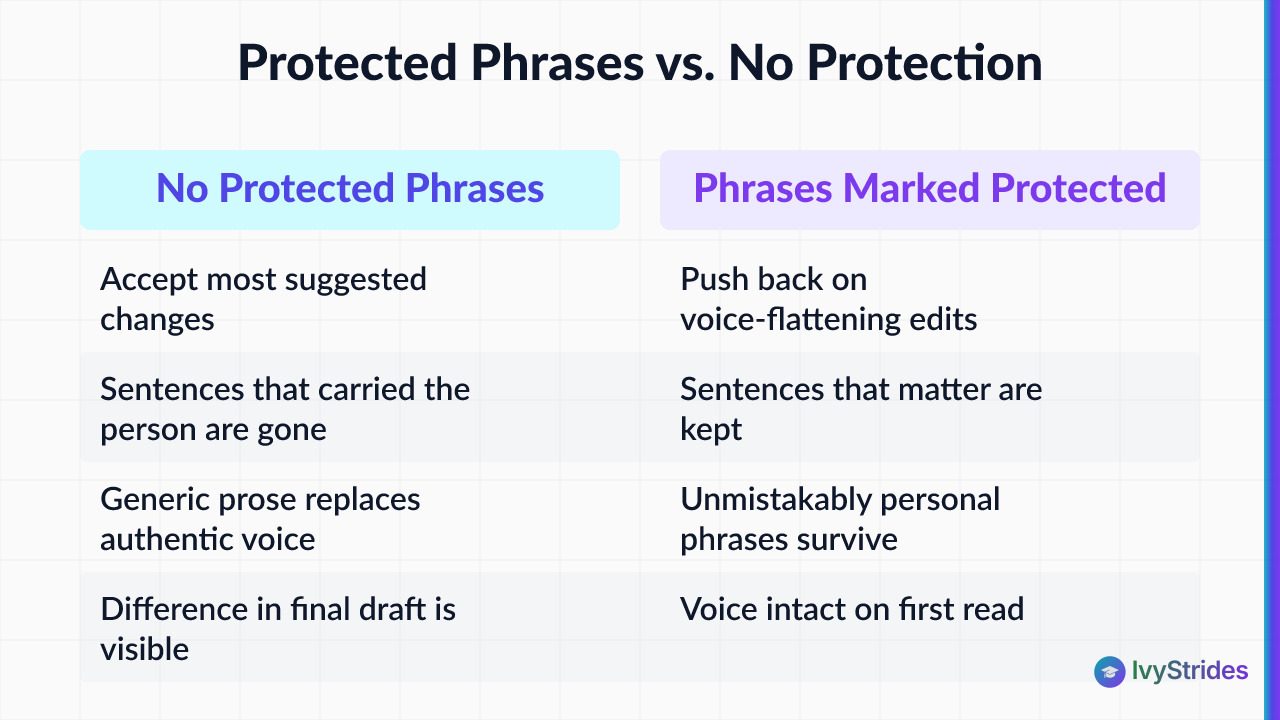
Voice disappears because most writers start editing without protecting anything first. They open the draft, accept the internal critic's opening bid ("this sentence is too casual"), and start rewriting from the top. By the third pass, the sentences that carried the actual person are gone, replaced by sentences that carry no one in particular.
Students who freeze during timed writing sections often over-edit sentences mid-draft for the same reason they over-edit essays: the internal critic is louder than the internal author. The critic wants safety. Safety, on the page, looks like generic prose.
There's a fix, and it takes about 15 minutes before you share the draft with anyone. Read the essay aloud from start to finish. Highlight three to five phrases that sound unmistakably like you: an aside, a rhythm, a word choice a teacher would recognize as yours. Mark them as protected. Then send the draft out for feedback. When suggestions come back, the protected phrases stay, no matter how many reasonable-sounding reasons a reader gives for changing them.
In our coaching, students who share a first draft without marking protected phrases tend to accept most of the suggested changes, including the ones that flatten voice. Students who mark protected phrases first push back on roughly the same volume of suggestions but keep the sentences that matter. The difference in the final draft is visible on a first read.
The stakes are highest in the college essay because the student's specific perspective is the primary differentiator in an applicant pool where most candidates have similar grades, scores, and activities. For patterns to watch, see common college essay mistakes to avoid. The same principle applies when revising your Common App personal statement: every edit that removes a sentence you would actually say out loud is an edit that costs you authenticity with an admissions reader. If you want a coach's read on which phrases are working, our common app essay tutor team is set up for that kind of review.
Step-by-Step: How to Keep Your Voice While Editing Written Work
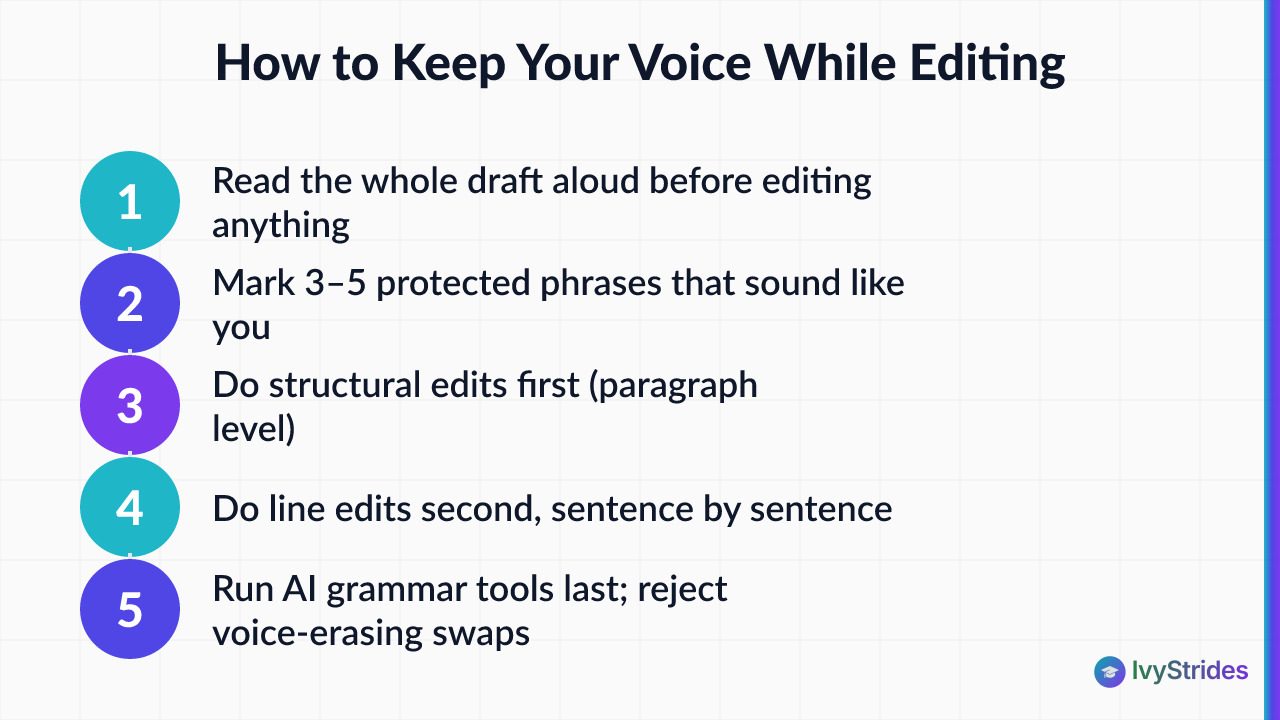
Here is the ordered process. Follow it in sequence. Don't skip forward.
Step 1. Read the whole draft aloud before editing anything. Not silently. Out loud. The read-aloud test is the single fastest voice-check method, because your ear catches the sentences that sound imported before your eye ever does. Mark anything that makes you pause because it doesn't sound like you talking.
Step 2. Mark three to five protected phrases. These are the sentences or fragments a friend would read and say, "Yeah, that's you." Write them down somewhere separate. They don't change in later rounds, regardless of the feedback.
Step 3. Do structural edits first. Is the opening earning the read? Is the middle paragraph actually about the topic you promised? Does the ending resolve or just stop? Cut, move, and combine at the paragraph level before touching individual sentences. In our coaching, students who follow structural-first order preserve voice at a higher rate because they aren't rewriting sentences that may be cut anyway.
Step 4. Do line edits second. Now, and only now, work sentence by sentence. Each sentence gets one question: does this sound like something I would say? If yes, leave it. If no, either rewrite it in your own register or cut it.
Step 5. Run AI grammar tools last, and reject any suggestion that changes voice. If an AI tool suggests replacing "I figured out" with "I determined," that's a voice-erasing swap for most high school writers. Accept the comma fixes. Reject the vocabulary upgrades that push you out of your natural register. Use track changes so every substitution is visible and reversible.
Step 6. Read aloud again after every round. Every round. If a sentence stops sounding like you between drafts, something in the last pass went too far. Roll it back.
For the feedback-integration step, the practical challenge is deciding which reader's suggestions to weight and which to hold. How to get feedback on your college essay walks through how to filter input from teachers, parents, and peers. In our essay coaching work with students, the drafts that land best are the ones where the student protected two or three signature phrases from every round of feedback, keeping the essay sounding like a 17-year-old with a point of view rather than a polished committee document. If you want structured feedback on a specific draft, our essay review service is built around voice-preserving revision.
How to Make Your Voice Sound Better in Editing Without Losing What Makes It Yours
Whether you're editing a podcast voiceover or a college interview prep recording, the goal is the same: remove the distractions without removing the person. The tools are simple. The trick is restraint.
High-pass filter. Set the cutoff around 80-100 Hz. This removes low-end rumble from air conditioners, traffic, and desk vibrations without touching the warmth of your voice. Apply it first. It's the least likely to cause harm.
Compression. A ratio of roughly 3:1 to 4:1 with a moderate attack is a typical starting point for voice recordings in a digital audio workstation (DAW). Compression evens out the difference between loud and quiet moments so your listener doesn't have to keep adjusting volume. Push the ratio above about 6:1 and the voice starts to sound pumped and unnatural. In our audio coaching observations, creators who apply compression above 6:1 consistently report that their recordings sound processed and no longer like themselves.
De-esser. Use it to reduce harsh sibilance on "s" and "sh" sounds. Apply sparingly. A heavy de-esser produces a lispy result that's worse than the original problem.
Crossfades at edit points. Use roughly 5-10 ms crossfades instead of hard cuts to avoid clicks and preserve natural breath flow. Hard cuts on a voice track are the single easiest way to make a recording sound amateurish.
Recording environment. Foam panels, blankets, and soft furniture absorb reflections that make a voice sound thin or echoey. A closet full of hanging clothes is one of the most effective free acoustic treatment options for students recording at home. If you're serious about consistent audio, treating the room does more than any plug-in ever will.
For mobile editing, CapCut includes a voice enhance button that applies noise reduction and basic EQ in one tap. It's a practical starting point on Android or iPhone. On desktop, Audacity is free and gives you individual control over EQ (equalization), compression, and de-essing. Adobe Enhance Speech is a stronger AI-based option for noise removal, but use it at reduced intensity, roughly 50 percent or less, to avoid the processed sound that comes from pushing any AI restoration tool too hard.
If you're recording practice sessions for standardized tests, our act practice test online library covers the score-band analysis side of the work.
How to Make Your Voice Sound Good While Recording (So Editing Is Easier)
The best voice edits start before the record button is pressed. A clean source recording needs less processing, and less processing preserves more of your natural voice.
Stay about 6-8 inches from the microphone. Closer, and plosives on "p" and "b" sounds distort the waveform. Farther, and you pick up more of the room than of yourself. Leave 2-3 seconds of silence before and after each take. That silence isn't wasted; it gives you clean room tone to use as background for edits and fades.
Record away from windows and appliances. A refrigerator cycle or a passing car goes into the take whether you notice it or not. On a phone, use the rear microphone rather than the front-facing one. The rear mic on most iPhones and Android devices has better frequency response and captures a fuller voice.
A quick vocal warm-up (a minute of humming, a few tongue twisters) opens the tone and reduces the raspiness that shows up in the first take. Small, and it matters. The recording you edit is only as good as the recording you started with.
For students building a study routine around recorded practice, see our full SAT prep overview for the diagnostic-first framework.
How Do You Actually Hear Your Real Voice? Understanding the Playback Gap
Almost everyone hates the first recording they hear of their own voice. There's a reason, and it's physiological.
When you speak, you hear yourself through two channels at once: air conduction (sound traveling through the air to your ears, which is what everyone else hears) and bone conduction (vibrations traveling through your skull, which is what only you hear). Bone conduction adds low-frequency warmth and depth that recordings don't capture. Playback gives you the air-conducted version only, which sounds thinner and higher than the voice in your head.
This isn't a recording flaw. It's not evidence that you need to change your voice. It's the same gap everyone experiences the first time they hear a clip of themselves.
The practical fix: listen to a 30-second clip three times in a row before making any judgment about how the voice sounds. Honestly, the discomfort typically drops significantly by the third listen, because your brain begins to accept the external version as one of your voices. Focus on whether the content is clear, not whether the voice matches an imagined ideal. Your audience doesn't have the internal reference point you do; they hear you the way the recording sounds.
The pattern shows up on Reddit constantly: creators who want to quit because they can't stand hearing themselves. It's a universal experience, not a personal deficiency. The same discipline of listening objectively applies elsewhere in test prep too, whether you're reviewing a recorded practice explanation or a session recap. For a related process, see how to review your SAT practice test mistakes.
Using AI Editing Tools Without Letting Them Flatten Your Voice
AI editing tools are useful, and they're dangerous in the same way for the same reason: they optimize toward a statistical average. That average is not your voice.
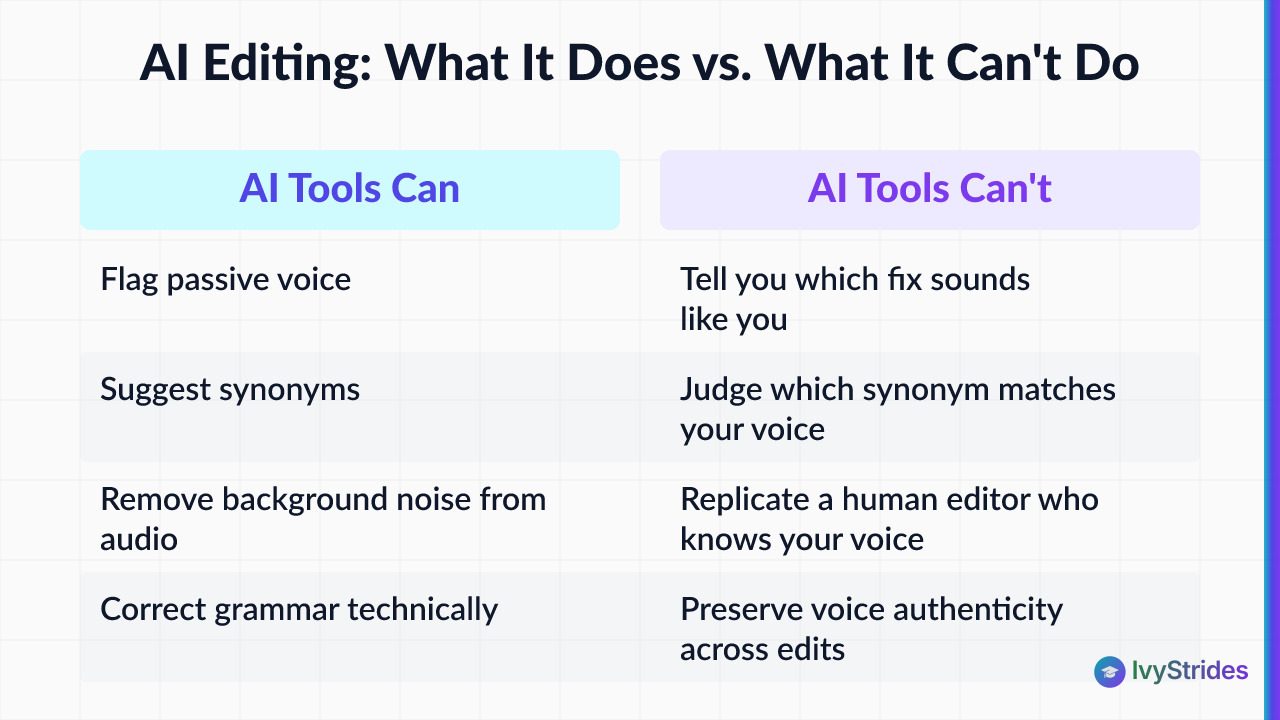
For writing, tools like Grammarly and ChatGPT flag passive voice, suggest synonyms, and rewrite sentences for concision. Use them, but with a rule: after running any AI writing tool, read the revised draft aloud and reject any suggestion you wouldn't say in a conversation with a teacher or friend. AI tools can flag passive voice and suggest synonyms, but they can't tell you which synonym sounds like you, which is exactly the judgment call that separates a memorable essay from a forgettable one.
Here's the part most students miss. In our coaching, students who accept every AI grammar suggestion in their college essays often produce drafts that score lower on voice authenticity in our internal review, even when the grammar is technically correct. The pattern is small, cumulative losses: a "figured out" becomes "determined," a "kind of" becomes "somewhat," and by the fifth pass the essay reads like it was written by an adult copyeditor. That reads exactly the way it sounds to an admissions reader.
For audio, Adobe Enhance Speech and Voice.ai remove background noise effectively but can introduce artifacts (a slight underwater quality, unnatural sibilance handling) when pushed too hard. Start at 50 percent intensity or less and increase only if the source recording is genuinely unusable. Make-my-voice-sound-better AI tools are improving quickly, but they can't yet replicate the judgment of a human editor who knows your voice.
The workflow that protects voice: use AI for structural feedback first (does the argument hold, does the intro earn the read), do your own line edits second, then run grammar tools last on a locked-down draft. Order matters. If AI touches your sentences before you do, its patterns anchor your revision, and the essay drifts toward the average.
If a parent or family member is offering feedback alongside AI tools, how can parents help with the college essay covers the boundaries that keep the student's voice intact.
Voice Preservation in the College Admissions Essay: Why the Stakes Are Higher Here
The Common App personal statement gives you 650 words. Supplemental essays typically give you less, sometimes as little as roughly 100 or 200 words per prompt. Every word carries weight, and voice is the differentiator that separates one strong applicant from another.
Admissions readers at selective colleges read hundreds of essays per cycle. Over-edited essays that sound committee-written are identifiable within the first paragraph and forgettable by the last. In our essay coaching work across hundreds of supplemental essay drafts, the essays that receive the strongest feedback are the ones where the student's specific perspective, humor, or phrasing is still present in the final draft. The essays that get returned with "sounds like every other application" feedback are the ones where the voice was edited into something safer.
Here's a fast diagnostic. If you can swap your name for another student's name and the essay still works perfectly, the voice has been edited out. A strong essay wouldn't read the same way with anyone else's name on it. That specificity is the point.
One caveat, and it's a real one: college admissions outcomes depend on the full application, not the essay alone. Scores, grades, activities, recommendations, and school-specific priorities all factor in. Voice preservation improves essay quality; it doesn't guarantee admission at any specific school. What it does is make sure the reader who spends a few minutes on your file remembers the student, not the sentences.
For students who want structured support, our one-on-one help for common app essay coaches work on voice preservation across drafts. If AP coursework is also part of your admissions strategy, our ap courses online run as per-subject specialist classes.
FAQ
How do I edit a video that uses my own voice without losing the natural feel?
Import the clip, cut only sections with long pauses, mistakes, or background noise, and use roughly 5-10 ms crossfades at every edit point rather than hard cuts. Apply a high-pass filter at around 80-100 Hz and a gentle 3:1 compressor. On mobile, CapCut's voice enhance button is a fast starting point. The goal is to remove distractions, not process the voice into something unrecognizable.
Why does my voice sound so different when I record it?
When you speak, you hear your voice through both air conduction and bone conduction vibrations inside your skull. Recordings capture only the air-conducted sound, which is what everyone else hears. The result sounds thinner and higher than you expect. This is a physiological reality, not a recording flaw. Listening to the same clip three times in a row typically reduces the discomfort as your brain adjusts to the external version.
Which app is good for voice editing on a phone?
CapCut includes a voice enhance button that applies noise reduction and basic EQ in one tap, making it practical for editing on Android or iPhone. For more control, Audacity is free on desktop and gives access to EQ, compression, and de-essing individually. Voice.ai and Adobe Enhance Speech are AI-powered options that work well for noise removal but should be used at reduced intensity to avoid over-processing.
How do I stop hating my voice when I edit and record?
The discomfort is nearly universal among first-time and early-stage recorders and comes from the gap between how you hear yourself internally and how a recording captures your voice. Listen to a short clip three times before making any judgment, focus on whether the content is clear rather than whether the voice sounds ideal, and remember that your audience doesn't have the internal reference point you do. Repeated exposure reduces the discomfort substantially over time.
How do I add a voiceover to a video online?
Most online video editors, including CapCut web, Clipchamp, and Adobe Express, include a voiceover recording feature. Open your project, select the audio track, and use the record function to lay your voice over the timeline. Record in a quiet space, leave about two seconds of silence before speaking, and apply a light noise reduction pass after recording. For college interview prep videos or essay brainstorming recordings, the same workflow applies.
Is an essay editing service worth it for college applications?
A good essay coach helps you identify structural weaknesses and unclear passages without replacing your voice with theirs. The question to ask before hiring any service is whether they edit with you or for you. In our coaching approach, coaches ask questions and suggest directions rather than rewriting sentences, which keeps the student's voice intact. Admissions readers can identify essays written by an adult, and that recognition typically hurts an application rather than helping it.
Your voice is the reason an admissions reader remembers your file over the one before and the one after. Protect it before you edit, restore it after every round, and keep the sentences a friend would recognize as yours. The polish comes from clarity, not from replacement.

Award-winning author (South Asian Book Award) and graduate of BITS Pilani and UCLA Luskin School of Public Affairs. Brings a published writer's eye to Common App essays and grammatical precision to SAT and ACT R&W instruction.